Building Bulletproof ADF Pipelines
Background
As software engineers we spend so much of our time building these beautiful, complex data pipelines. We design them to move mountains of information... but let's be honest, we often cross our fingers and hope they don't break. And when they do? A pipeline that fails without making a peep - especially in a system like Azure Data Factory (ADF) - is a genuine nightmare.
Working with Azure Data Factory (ADF), I’ve learned that silent failures are the kind you want to avoid at all costs. If you’re new to ADF, adopting some good practices early on makes troubleshooting and monitoring far less painful.
That’s why I’ve put together this practical guide. It’s not theory or textbook stuff—it’s the lessons I’ve picked up while setting up error handling, logging, and alerts in real projects.
Here’s what I’ll walk you through:
- A cursory overview of what Azure Data Factory (ADF) actually is
- The use case we're implementing
- Error Handling: Building a Safety Net for Your Data
- Setting up effective Alerts.
1. A cursory overview of what Azure Data Factory (ADF) actually is
To effectively implement ADF pipelines, you need to know its basic structure. I like to think of it like a coordinated job site. Each part has a specific role, and they all work together to move the data:
- Pipelines: The overall Project Plan — the sequence of steps we need to execute.
- Activities: The individual Workers on the site who have specific tasks like drilling, moving, or mixing.
- Datasets: What data looks like at the source and the sink.
- Linked Services: The Credentials and Keys needed to access the storage, databases, or external systems.
- Data Flows: The Specialized Equipments for heavy duty - Visual data transformation (when you need to reshape data without writing boiler plate code).
- Integration Runtimes: The actual Machinery and Power Source that runs everything — the compute environment.
2. The use case we're implementing
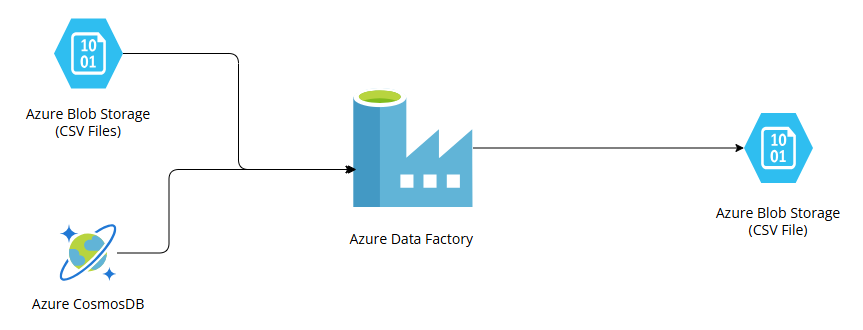
We're tackling a classic real-world problem: Data Sprawl
Here is what we need to accomplish:
- We have critical business data living in two different neighborhoods
- Standardized data sitting in a bunch of CSV files inside our cloud storage bucket i.e. Azure Blob Storage
- Semi-structured data stored in Azure Cosmos DB .
We need to build a pipeline that goes out, collects all those pieces, then performs some necessary calculations and clean-up (transform/aggregate). The end goal is to create one single, easy-to-read CSV file and deliver it straight to another dedicated folder in our Azure Blob Storage.
This is a perfect example of what ADF is designed to do - seamlessly knit together data from multiple homes.
3. Error Handling: Building a Safety Net for Your Data
When you're just starting out, the best piece of advice I can give you is this: don't skip the safety net. Make sure you adopt a standard error-handling pattern and use it religiously in every critical pipeline you build. This consistency is what allows you to reliably capture failures and all their important details - it's the foundation of troubleshooting!
The goal is to make sure your pipeline doesn't just crash silently; it needs to report back exactly what went wrong.
The two most common and reliable methods for achieving this are:
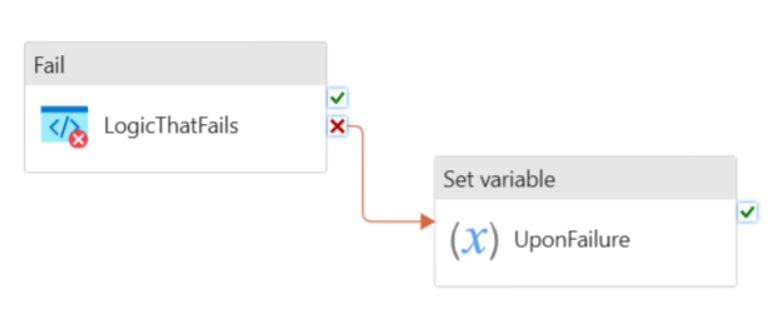
- Try/Catch with “On Failure” path
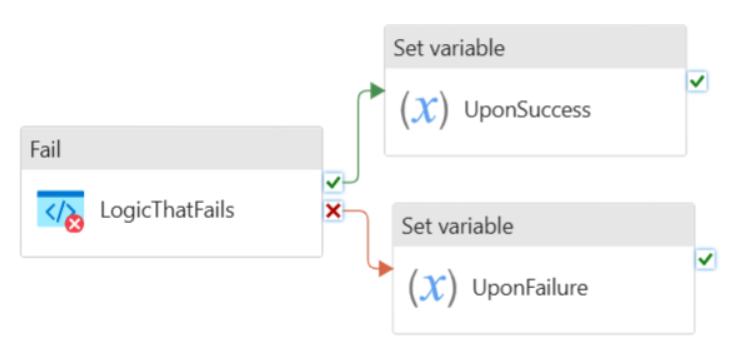
- Do "If Else" block with success and failure paths
4. Setting up effective Alerts
Okay, we've built the safety net (Error Handling), but now we need the alarm system! A silent failure is the enemy, so setting up effective alerts is critical.
In the Azure universe, there are several ways to configure Alerts, but we need something that gives us broader control for configuring and setting up ADF pipeline alerts. That's why we're going straight for Log Search Alerts. They are powerful because they let us define custom criteria based on the logs generated by our system.
A Log Search Alert essentially has three parts:
- Scope: This is where we select the specific resources that the alert should watch.
- Alert Conditions: We write a custom search query that defines the exact scenario that must happen to trigger the alert.
- Actions: What should happen when the alert fires? Send an email? Hit a webhook?
Because our ADF pipeline relies on many moving pieces, I like to split our alerting strategy into two clear buckets:
- Infrastructure Alerts (What's happening around ADF?)
- ADF Alerts (What's happening inside ADF?)
4.1 Infrastructure Alerts
Our pipeline depends entirely on our external services behaving well. If our dependencies — like the storage or the database are struggling, our pipeline will fail, too. So, we set up alerts for:
4.1.1 Azure Blob Storage Alerts
| Alert Description | Log search query for Alert Conditions | Severity |
|---|---|---|
| Alert for non-existence of source folder | StorageBlobLogs | where tostring(ObjectKey) contains_cs "blob-strg-ac/src-folder" | where StatusText == "PathNotFound" | Critical |
| Alert for non-existence of destination folder | StorageBlobLogs | where tostring(ObjectKey) contains_cs "blob-strg-ac-dest/output-folder" | where StatusText == "PathNotFound" | Critical |
| Alert for non-existence of generated CSV file | ADFActivityRun | where Status == "Failed" | order by TimeGenerated desc | Critical |
4.1.2 Azure ComsosDB Alerts
| Alert Description | Log search query for Alert Conditions | Severity |
|---|---|---|
| Alert for CosmosDB Failures | ADFActivityRun | where Status == "Failed" | where Error has "cosmosDB" | order by TimeGenerated desc | Critical |
| Alert for CosmosDB Throttling (i.e. 429 Errors) | AzureDiagnostics | where Category == "DataPlaneRequests" | where statusCode_s == "429" | order by TimeGenerated desc | Critical |
| Alert for CosmosDB Query latency (> 10 sec) | Ref 0 | Critical |
Ref 0
1AzureDiagnostics
2    | where OperationName == "Query"
3    | where databaseName_s == "cosmos-db-container-name"
4    | extend DurationMsNumeric = todouble(duration_s)
5    | summarize AvgLatencyMs = avg(DurationMsNumeric), RequestCount = count(), MaxLatencyMs = max(DurationMsNumeric), MinLatencyMs = min(DurationMsNumeric) by bin(TimeGenerated, 1h), Resource, ResourceGroup, SubscriptionId, OperationName
6    | where AvgLatencyMs > 10
7    | order by TimeGenerated desc
4.2 ADF Alerts
This is where we check the actual data movement engine. Since ADF is made of:
- Pipeline
- Activity
- Integration Runtime and Data Movements
we need specific alerts for each failure point:
4.2.1 Pipeline Alerts
| Alert Description | Log search query for Alert Conditions | Severity |
|---|---|---|
| Alert for Pipeline Failures | PipelineFailedRuns > 0 | Critical |
| Alert for Pipeline Execution Duration | [Ref 1] | Critical |
Ref 1
 1let InProgressRuns =
 2  ADFPipelineRun
 3    | where Status == "InProgress"
 4    | order by TimeGenerated desc;
 5
 6let CompletedRuns =
 7  ADFPipelineRun
 8    | where Status in ("Succeeded", "Failed", "Cancelled")
 9    | order by TimeGenerated desc;
10
11InProgressRuns
12  | join kind=leftanti (CompletedRuns) on RunId
13  | extend RunDuration = now() - Start
14  | where RunDuration > 1h
15      and TimeGenerated >= ago(1d)
4.2.2 Activity Alerts
| Alert Description | Log search query for Alert Conditions | Severity |
|---|---|---|
| Alert for Activity Failures | ActivityFailedRuns > 0 | Critical |
| Alert for Activity Execution Duration | [Ref 2] | Critical |
Ref 2
 1let InProgressRuns =
 2  ADFActivityRun
 3    | where Status == "InProgress"
 4    | order by TimeGenerated desc;
 5
 6let CompletedRuns =
 7  ADFActivityRun
 8    | where Status in ("Succeeded", "Failed", "Cancelled")
 9    | order by TimeGenerated desc;
10
11InProgressRuns
12  | join kind=leftanti (CompletedRuns) on ActivityRunId
13  | extend RunDuration = now() - Start
14  | where RunDuration > 1h and TimeGenerated >= ago(1d)
4.2.3 Integration Runtime and Data Movement Alerts
| Alert Description | Log search query for Alert Conditions | Severity |
|---|---|---|
| Alert for Integration Runtime availability | IntegrationRuntimeAvailableNodeNumber < 1 | Critical |
| Alert for Blob Storage Read failures | [Ref 3] | Critical |
| Alert for Blob Storage Write failures | [Ref 4] | Critical |
Ref 3
1StorageBlobLogs
2  | where ObjectKey has "strg-blob-container-name/src-folder"
3  | where Category == 'StorageRead'
4  | where StatusText != 'Success'
Ref 4
1ADFActivityRun
2  | where ActivityType == "Copy"
3  | where Status == "Failed"
Wrapping Up: Building a Resilient ADF Pipeline
We walked through the essentials of setting up a bulletproof error handling framework and smart / loud alerts for Azure Data Factory pipeline — the one that brings data together from all its different homes and lands it safely.
The most important takeaway?
When your production pipelines are backed by this level of operational maturity, troubleshooting stops being a late-night nightmare and starts being precise. You can finally trust your data workflow to be resilient and truly reliable.
comments powered by Disqus